













Note: This guide does not apply to PayPal. Chargeblast offers both Ethoca and RDR coverage for PayPal, but they work differently from other APMs:
- Ethoca is only offered to high-value PayPal clients, since implementation is involved — it requires modifying your PayPal billing descriptor and completing a 30–60 day QA process directly with Ethoca and PayPal before going live.
- RDR is comparatively simple: the merchant just needs to contact PayPal support for an ARN code and submit it under Settings > Enrollment Status.
- RDR alone gets roughly 18% coverage; combined with Ethoca, coverage is around 25%. Consumer complaints routed directly to PayPal (rather than through the cardholder's issuing bank) can't be intercepted either way.
Chargeback Prevention Alerts for APMs (Cash App, Venmo, and Others)
This guide explains how to configure chargeback prevention alerts for Alternative Payment Methods (APMs) such as Cash App, Venmo, and similar providers. The process outlined below has been validated with Cash App and can be applied in a similar manner to other APMs.
Understanding How Disputes Occur on APMs
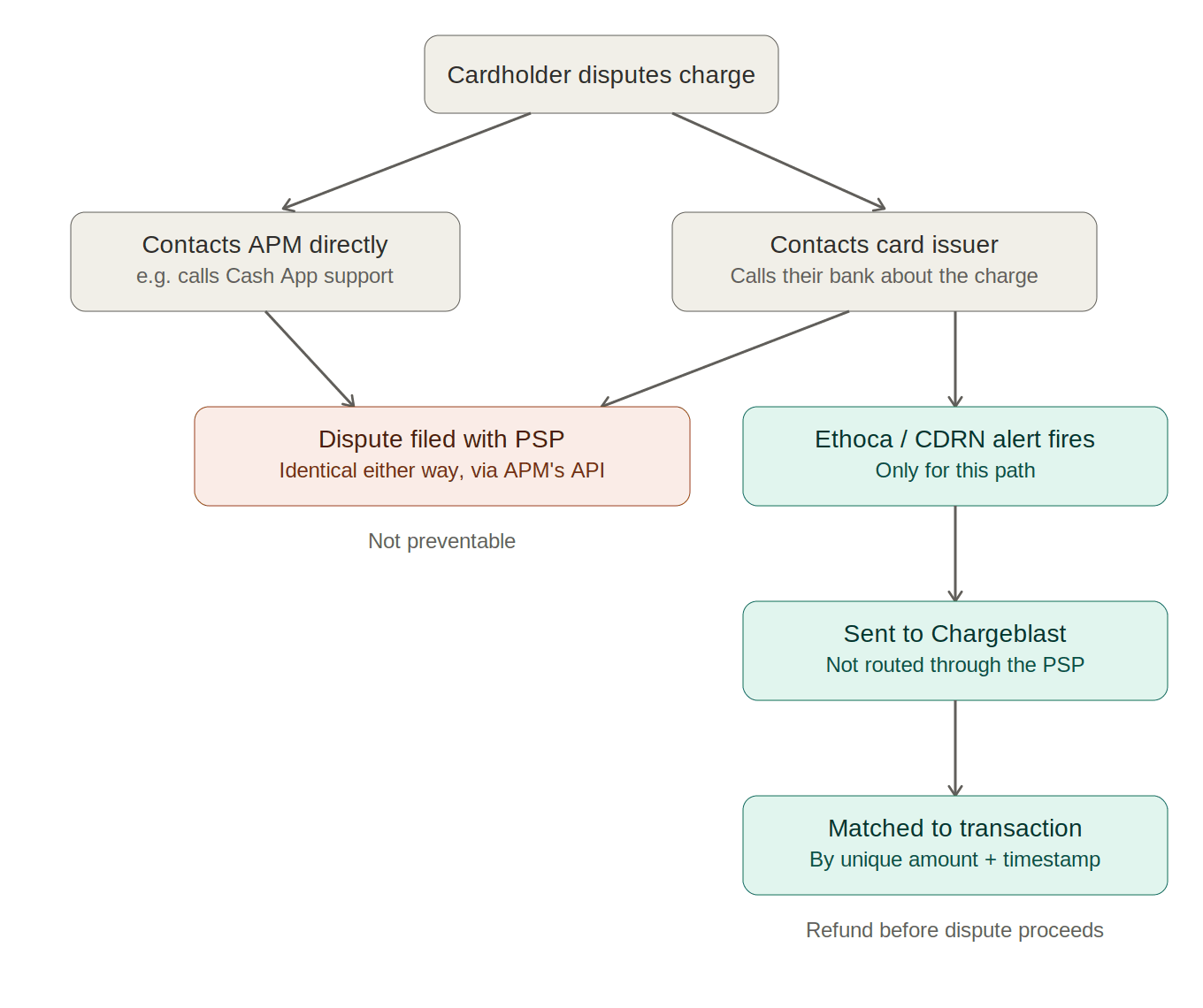
Before configuring alerts, it is important to understand how a cardholder can initiate a dispute on an APM like Cash App. Disputes typically originate through one of the following channels:
- Directly contacting the APM provider (e.g., calling Cash App to file a complaint)
- Contacting the underlying funding instrument (e.g., calling their bank or card issuer)
When a dispute is initiated directly with the APM, it generally cannot be intercepted. These cases are not traditional card-network chargebacks, as they do not flow through Visa or Mastercard rails. Instead, they are generated internally by the APM and passed to the payment service provider (PSP) via the APM's integration.
For example, Cash App submits disputes to Stripe using its dispute endpoints, regardless of whether Cash App itself incurs an issuing dispute fee with Visa or Mastercard. Both bank-initiated chargebacks and APM-originated disputes are modeled identically, making it difficult—or impossible—to determine the original source of the dispute.
This guide focuses specifically on preventing disputes initiated through the funding instrument (scenario 2).
Setting Up Alerts
The first step is to enroll the APM billing descriptor with an alerting network such as Ethoca or CDRN (Ethoca is recommended).
For Cash App transactions, the billing descriptor typically appears as:
CASH APP*DOORDASH
For merchants processing through Stripe, the format is generally:
CASH APP*$shortened_statement_descriptor
We recommend enrolling both CASHAPP* and CASH APP* variations of your statement descriptor, as transaction volume is usually concentrated on the CASH APP* format. Be sure to include your merchant name in the enrollment; otherwise, the request may be rejected.
For other APMs, you can identify the correct statement descriptor by running a test transaction or contacting the APM's support team.
Matching Alerts to Transactions
After enrollment, you will begin receiving alerts. The next step is to match each alert to the corresponding transaction. This can be challenging because PSPs typically do not provide underlying card details for APM transactions, and in many cases they do not possess this information themselves.
The most reliable matching strategy is to use unique dollar-and-cent amounts for APM transactions. For example, if a product is priced at $20.00, you can randomize the charge between $19.00 and $20.00. The cent value, combined with the transaction timestamp, can then be used to identify the matching transaction.
Unfortunately, beyond the transaction amount and timing, there are no other reliably manipulable data points available for matching APM alerts.
Verifying the Setup
Once unique pricing is implemented and the appropriate descriptors are enrolled, the final step is to ensure that your Chargeblast account has access to your APM transactional data.
For processors such as Stripe, this typically works out of the box. However, we recommend contacting support to confirm that APM transaction data is fully included and properly ingested.
Was this article helpful?
Help us improve our documentation