













Follow these steps to connect your ChargeOver account to Chargeblast
- Navigate to the Integrations tab on Chargeblast here
Enter the following:
- Subdomain— your ChargeOver account's subdomain
[merchant].chargeover.com - Public Key and Private Key — from that ChargeOver account's API credentials
- If you have more than one ChargeOver subdomain/account to connect, repeat step 2 for each one
Click Save Changes and Activate
Getting your Public Key and Private Key:
- Log in to that ChargeOver account
- Go to Settings → Developer → More Dev Tools → REST API
- If the REST API isn't already enabled, enable it
- Copy the Public Key and the Private Key and store it somewhere secure. For privacy and security reasons, ChargeOver only shows it once and hides it from you afterward.
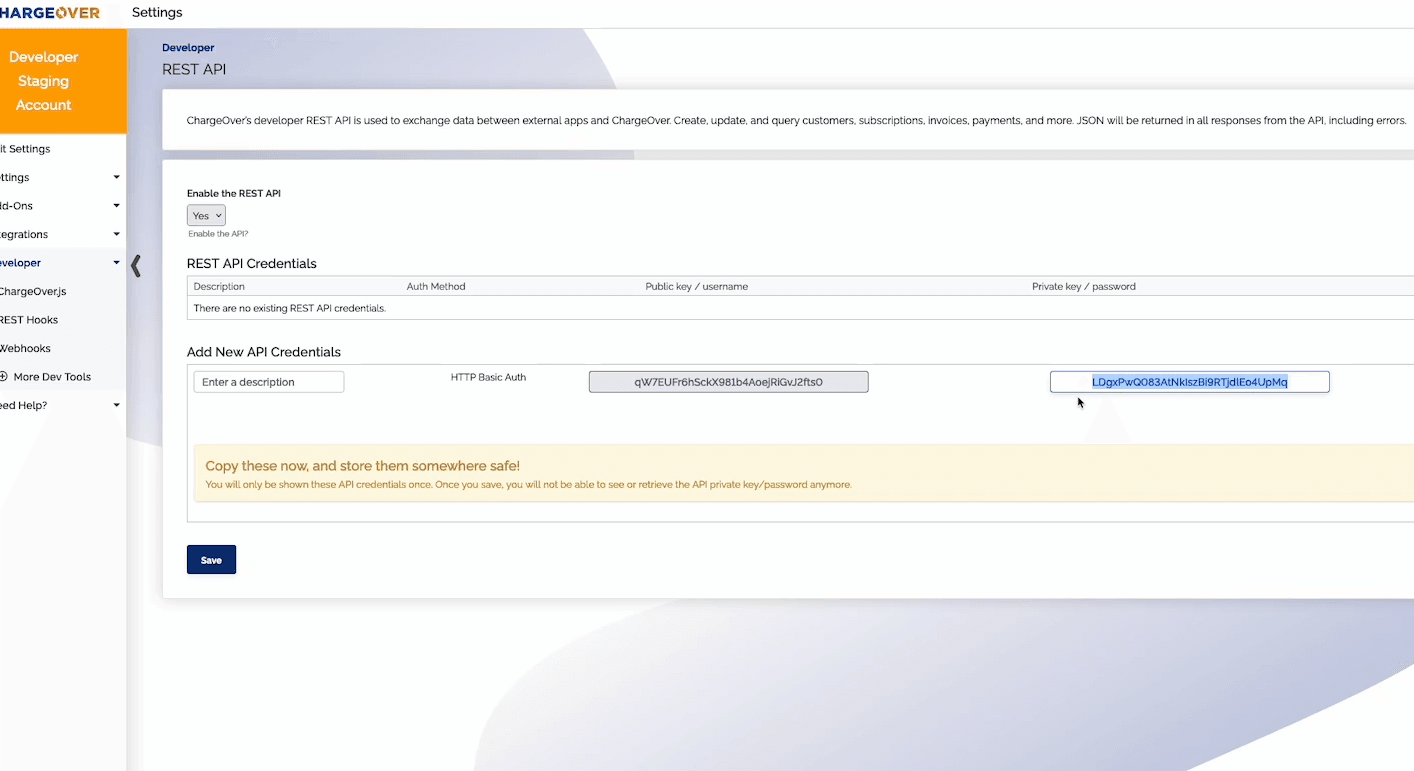
- Click the Save button to save the configuration
Tags
chargeoverintegration
Was this article helpful?
Help us improve our documentation