













Follow these steps to connect your Ecommpay account to Chargeblast
- Navigate to the Ecommpay Integrations tab on Chargeblast here
- Enter your API Token and Secret Key
- Click Activate, then click Save Changes
Getting your API Token and Secret Key:
- Log in to your Ecommpay Dashboard
- Click your user account name on the right of the main menu, then select My Profile
- Go to the API Tokens panel and click New Token
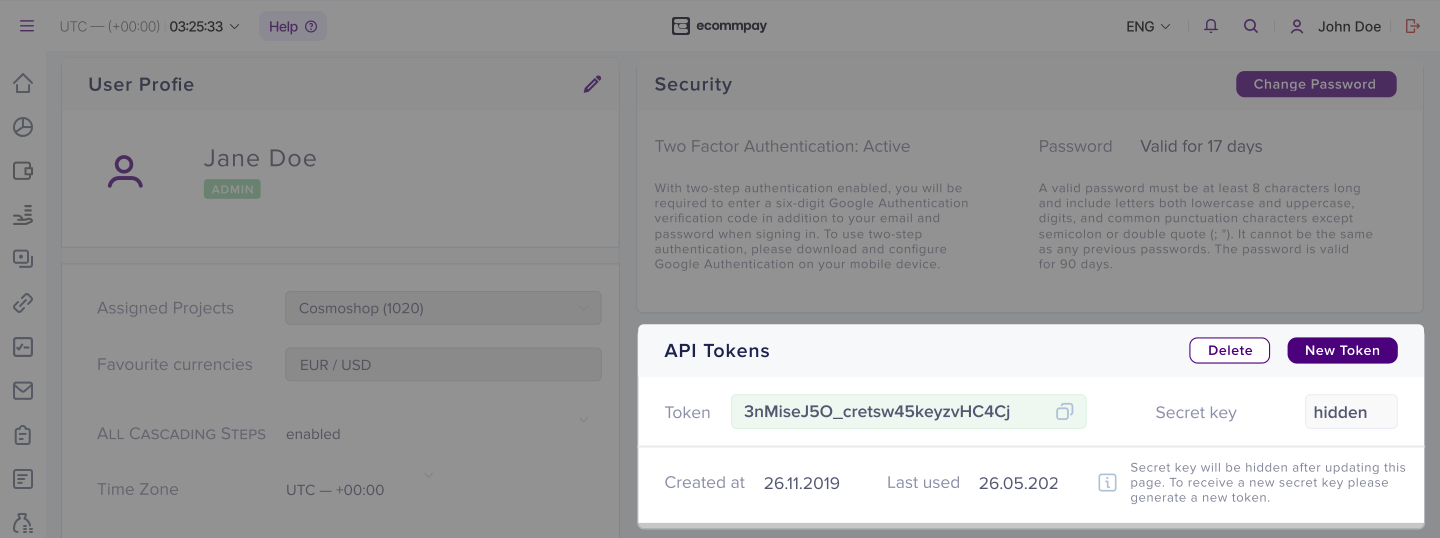
- Copy both the API Token and the Secret key right away (the Secret key is hidden once the page refreshes)
Note: You need the Manage API tokens permission to see the API Tokens panel. If it's missing, ask your Ecommpay Merchant admin to grant it in the My team section.
Tags
ecommpayintegration
Was this article helpful?
Help us improve our documentation