













Follow these steps to connect your Cybersource account to Chargeblast
- Navigate to the Cybersource Integrations tab on Chargeblast here
- Enter your Merchant ID, Key ID, and Shared Secret
- Click Save Changes, then click Activate
Getting your API Keys:
- Log in to the Cybersource Business Center
- Go to Payment Configuration → Key Management
- Make sure you're logged in to the right environment. Chargeblast needs production credentials to sync real transactions and match them to alerts:
-
Production account:
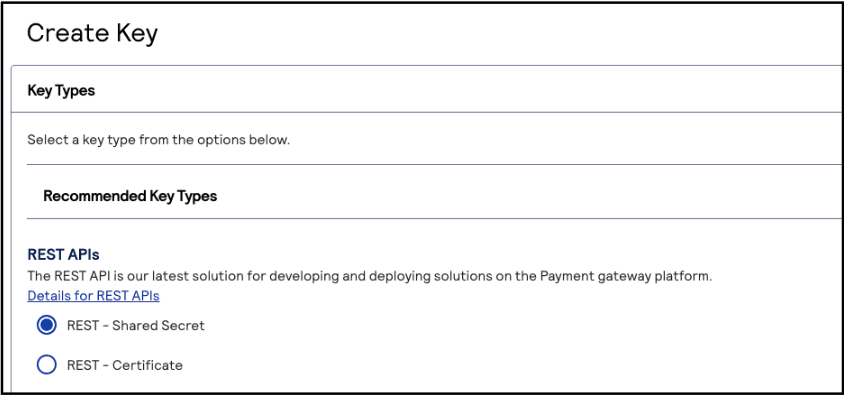
businesscenter.cybersource.com— pairs with Cybersource's live API host - Click + Generate Key, select REST – Shared Secret, then click Generate Key
- Copy the two values shown — the first is your Key ID, the second is your Shared Secret
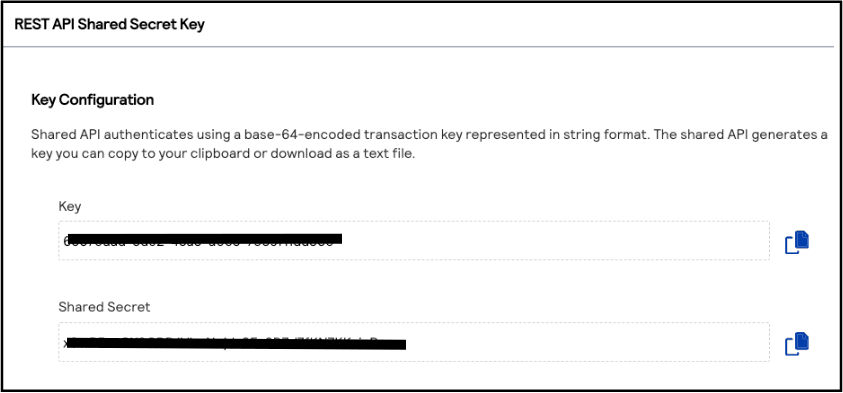
- Your Merchant ID is the same ID you use to log in to the Business Center. Paste all three values into the corresponding fields in Chargeblast.
Never expose your Shared Secret in client-side code or public repositories
Tags
cybersourceintegration
Was this article helpful?
Help us improve our documentation